

Evaluating AI CNC programming for production machining
Programming backlog becomes real when a hard alloy part is waiting, the senior programmer is buried, and the only output another tool gives you is code nobody wants to post without rebuilding the logic by hand. AI CNC programming software automates toolpath generation by pairing cutting physics with native CAM operations, letting programmers review editable setups rather than unverified G-code.
That distinction matters because the cost of the wrong choice is not abstract. In one precision aviation example, manual CNC programming for precision aviation components was described as taking from 1.5 hours to an entire day per part. If the AI system gives you editable operations inside the CAM environment you already use, it attacks that bottleneck directly. If it gives you a text file full of moves, the programming burden shifts into verification and repair, followed by reposting and tribal knowledge.
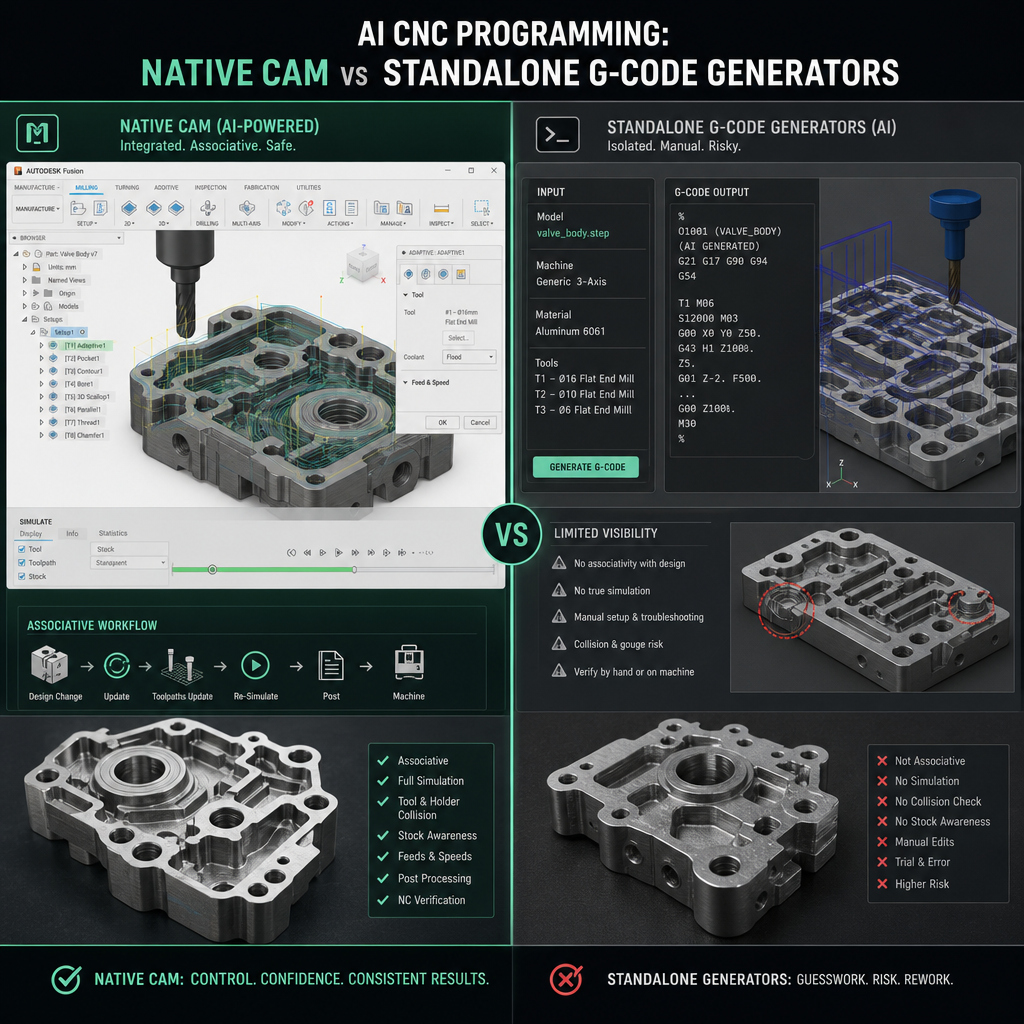
Why raw G-code generators break down on the factory floor
A G-code generator can look fast in a demo because code appears immediately. The problem starts when a programmer needs to understand why a tool was selected, how engagement was controlled, whether the holder clears, and how to change a finishing pass after first-article inspection. A reported aviation manufacturing example found AI-powered CAM software reduced total programming and refinement time from 90 minutes to 22 minutes. The meaningful part is the refinement time, because production programming always includes review and correction before approval.
Verdict: which AI CNC programming architecture fits your operation?
To cut through vendor claims before the detailed comparison, the answer is direct: native physical AI CAM add-ins are the better fit for production machining teams that need editable toolpaths and existing tool libraries while keeping programmer control. Standalone G-code generators can help with narrow code-writing tasks, but they create a verification gap on complex parts because the programmer is inspecting finished motion instead of a structured CAM setup. Legacy macros and feature templates still earn their place on repeatable families of simple work, but they struggle when geometry changes faster than the rules were written.
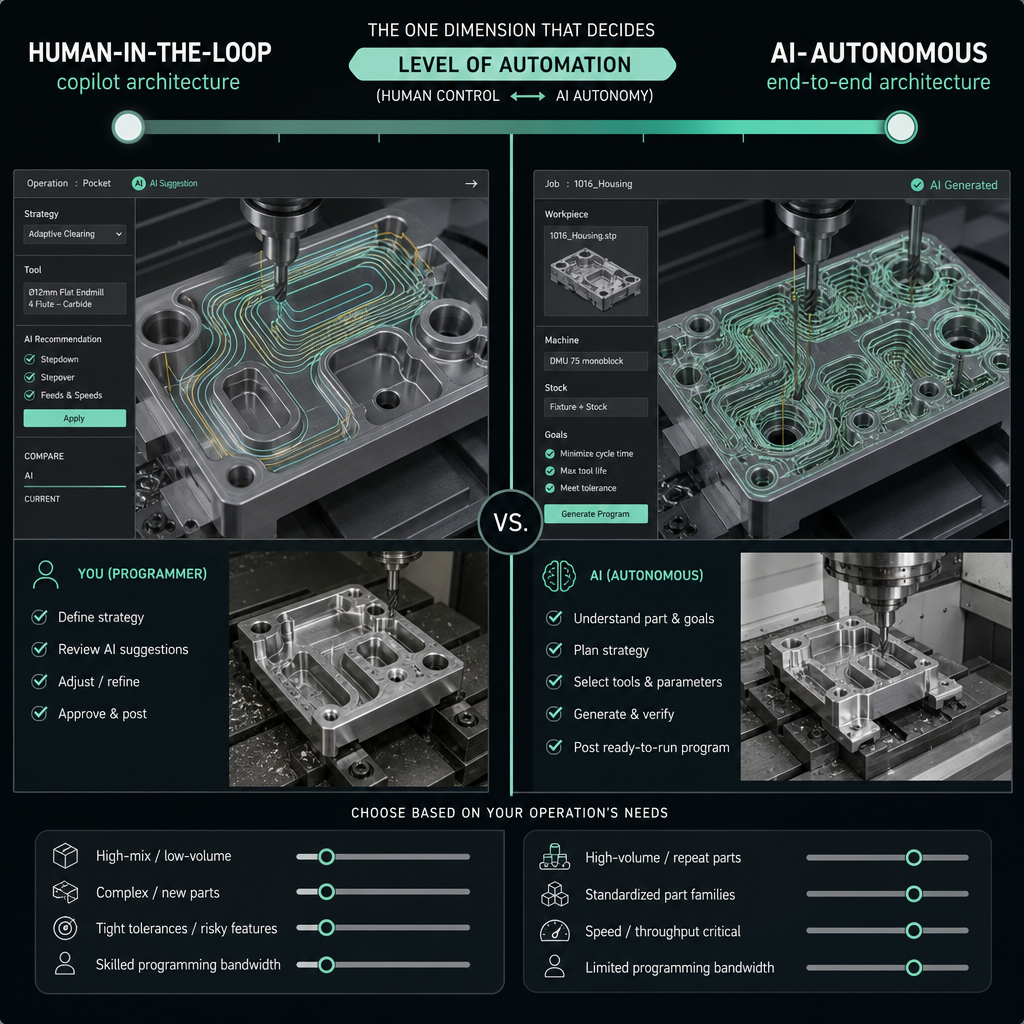
The best architecture for a serious factory keeps the programmer in the loop without forcing a restart. That means native operations with visible tool choices. It also means reviewable feeds and speeds, plus a path back into the CAM tree when something needs to change. The programmer should steer and review before approval. The software should handle repetitive setup work, not bury the reasoning inside a block of posted code.
A native physical AI approach also gives manufacturing leaders a cleaner way to measure value. The reported brand proof for this category is 50% less programming time and 90% fewer production-stopping errors. Those numbers matter only if they are achieved in the same workflow the team uses on paid parts. A separate code generator can show speed, but it does not answer the harder production question: can the lead programmer inspect the strategy and adjust the operation, then carry the setup into first article without losing control?
So the verdict is practical. If your work is multi-axis or mill-turn, or if it falls in aerospace, defense, medical, or tough alloy production, choose native physical AI CAM. If your work is simple, repeatable, and already well served by templates, legacy automation may be enough. If your tolerance for uneditable output is low, standalone G-code generation should stay out of the critical path.
Core evaluation criteria for factory-ready AI CAM
Once the standard is programmer-controlled production work, the comparison should focus on risk rather than feature lists. Lead programmers do not need another black box. They need to know whether the system can generate work they can inspect and adjust, then trust enough to run through normal verification.
The first criterion is native editability. A useful CAM tool should create operations that live inside the same programming environment as the rest of the part. That lets a programmer change a tool or revise a boundary. It also lets the same programmer tighten a tolerance strategy or repost through the normal process without rebuilding the job from scratch.
Native operation trees vs static toolpaths
The second criterion is traceability. Static toolpaths and posted code are hard to audit because the programmer sees the result, not the setup logic. Native operation trees preserve the structure of the decision, including the tool and holder, geometry selection and operation type, passes and linking, feeds and speeds, and the post path.
The third criterion is whether the tool respects real cutting constraints. Machining optimization research frames the trade-off around product quality processing time and processing costs, which are tied to surface finish and dimensional accuracy. Tool wear and chip behavior are tied to the same trade-off. That is the right lens for AI CAM because a faster program is not useful if it burns inserts, misses size, or creates unstable cuts.
Tool library integration and cutting physics for tough alloys
The fourth criterion is tool-library fit. A system that ignores your tools forces programmers to translate output back into reality. For Inconel, heat-resistant alloys, and other difficult materials, that translation is where mistakes appear.
The fifth criterion is review control. The software should help the programmer make a better setup, then let that programmer approve it before posting. That is the difference between useful automation and output that adds another inspection burden.
Comparison matrix: AI CNC programming approaches
With those criteria in place, the strongest choice is the one that reduces programming time without taking editability away from the people responsible for the part. The table below scores each architecture against the criteria that matter once the work leaves a demo and enters a factory process.
| Evaluation criterion | Native physical AI CAM add-ins | Standalone G-code generators | Legacy feature-based macros |
|---|---|---|---|
| Native editable CAM operations | Strong fit | Weak fit | Mixed fit |
| Uses existing tool libraries | Strong fit when integrated | Limited fit | Strong only where rules are maintained |
| Cutting-physics awareness | Strong fit when built for machining | Unclear or limited | Depends on programmer-authored rules |
| Programmer review and approval | Strong fit | Code-level review burden | Good for known templates |
| Multi-axis and mill-turn suitability | Best fit among the three | High verification burden | Limited by rule coverage |
| Best production use | Complex parts and difficult alloys | Narrow code tasks | Repeatable part families |
Schedule your free demo today to automate your CNC programming in minutes.
Option 1: native physical AI CAM integrations
Native physical AI CAM integrations keep programmers inside their primary CAM seats, which is why they fit the production problem better than detached code tools. The working model is close to how a strong lead programmer thinks: read the part and understand the available tools, then apply machining physics and create operations that can be reviewed before posting. The difference from standalone generation is where the work lands. The output is a CAM setup the team can inspect and edit, not a detached text file.
Native workflows inside Siemens NX, Mastercam, and PTC Creo
For teams using Siemens NX, Mastercam, or PTC Creo, this architecture respects the systems already carrying process knowledge. Tool assemblies and operation templates are part of the factory standard. So are posts, machine definitions, and programmer habits. A native tool that works inside those environments lets the programmer stay in the same review path instead of exporting geometry, generating outside code, and then repairing the result.
This matters most on mixed work: 3-axis roughing and finishing, 5-axis positioning, simultaneous paths, mill-turn work, tight clearance areas, and parts with inherited programs that nobody wants to rewrite from scratch. Native operations give the lead programmer a place to make judgment calls while still saving time on repetitive setup work.
Feeds, speeds, and first-article verification control
Feeds and speeds are another reason native CAM matters. Difficult materials such as Inconel and other heat-resistant alloys punish generic assumptions. A physical AI system should propose cutting parameters within the context of the tool and material, plus engagement and operation type, then leave final approval with the programmer.
The trade-off is that native integration has to be evaluated inside your real CAM process. A generic demo part is not enough. The right test is a part family your programmers already know, with your tools and your normal first-article checks. That is where the claimed 50% less programming time and 90% fewer production-stopping errors become meaningful or fall apart.
Option 2: standalone generative G-code platforms
Standalone G-code platforms look attractive because they seem to remove steps. A part or feature goes in, code comes out, and the demo moves quickly. For simple motion, that can be useful. For production machining, the programmer still has to prove the output before metal is cut.
The weak point is editability. Posted G-code is the end of a CAM process, not the place where most programmers want to make process decisions. If the code needs a different tool or a new clearance plane, that is already a warning sign. The same is true for a lead-in change, a revised stepdown, or a corrected finish strategy, because the edit may happen at the least structured level of the workflow. That adds risk because the logic that created the moves is separated from the moves themselves.
The black-box risk in multi-axis and mill-turn setups
The black-box problem grows with axis count. In 5-axis and mill-turn work, the programmer is managing tool orientation and collision envelopes. Workholding, tool reach, machine limits, operation order, and post behavior also have to stay under control. Code alone does not give a clean view of those decisions. Backplotting or simulation may catch problems, but that is different from editing the structured setup that created them.
Standalone generation also creates a process-control issue for manufacturing leaders. If one programmer accepts generated code and another rewrites it, the factory has gained a new source of variation. The software may reduce typing, but it can add review burden. For regulated or high-consequence parts, that trade-off is hard to justify unless the use case is narrow and the verification process is strict.
The fair recommendation is limited use. Keep standalone code generation away from critical first-article work unless your team has a controlled way to inspect and simulate every output, then document and approve it.
Option 3: legacy feature-based machining and CAM macros
Legacy feature-based machining and macros deserve a fair reading against modern AI models. They are not obsolete. In a stable part family, a well-maintained macro can save time and enforce known standards. If the geometry is predictable, the tools rarely change, and the programmer has already captured the right rules, deterministic automation can be useful.
The limit appears when the geometry stops matching the template. Feature recognition can identify holes, pockets, faces, and repeated shapes, but complex parts often need context that is harder to encode: thin walls, awkward reach, interrupted cuts, heat-sensitive materials, inherited fixtures, and a programmer's memory of what caused trouble last time. Rules can cover some of those cases, but somebody has to write and maintain them, and also know when they no longer apply.
Macros also tend to reflect the assumptions of the person who built them. That can be a strength in a controlled cell, but it becomes fragile when senior programmers retire or when work shifts to a new part mix. If the rule set is outdated, the automation still runs with confidence. That is exactly why lead review matters.
For standardized 2.5-axis work, drilling patterns, recurring pockets, and simple prismatic parts, legacy automation may be enough. For high-mix parts, difficult alloys, and operations that require judgment about cutting physics, native physical AI has a broader path because it evaluates the actual geometry instead of waiting for the part to fit a template.
Which AI CNC programming approach fits your team?
The right answer depends on the type of work and the risk your programmers carry. If you run high-mix aerospace, defense, medical, or other precision work in Siemens NX, Mastercam, or PTC Creo, pick native physical AI CAM. That is where the Limitless CAM Agent fits: it is built to program CNC parts inside those CAM environments while leaving review and approval with the programmer.
High-mix aerospace and defense production
If your bottleneck is senior programmer time, inherited programs, first-article fixes, or difficult alloy work, choose the architecture that produces editable native operations. You need your tools and machines reflected in the setup, along with your standards. A standalone generator may look faster at the start, but the inspection and correction loop can erase the gain.
If your facility is evaluating AI CNC programming for regulated parts, run the pilot on a known hard part rather than an easy demo. Use a part with real tool reach issues and real material constraints. Make sure it has enough operations to expose whether the system understands the manufacturing process.
Standardized 2.5-axis and rapid prototyping facilities
If your work is mostly standardized 2.5-axis machining with repeatable feature families, legacy macros may still make sense. They are easier to understand when the rules are simple and stable. If you need quick draft code for noncritical experiments, a standalone generator can have a narrow role, but it should not replace structured CAM review.
If you are responsible for production output, choose the tool that leaves your lead programmer with the most control after the AI has done its work. Limitless Labs reports 50% less programming time and 90% fewer production-stopping errors, but those metrics should be judged against your own parts, your own CAM process, and your own first-article standards.
Next steps for validating AI CAM in your factory
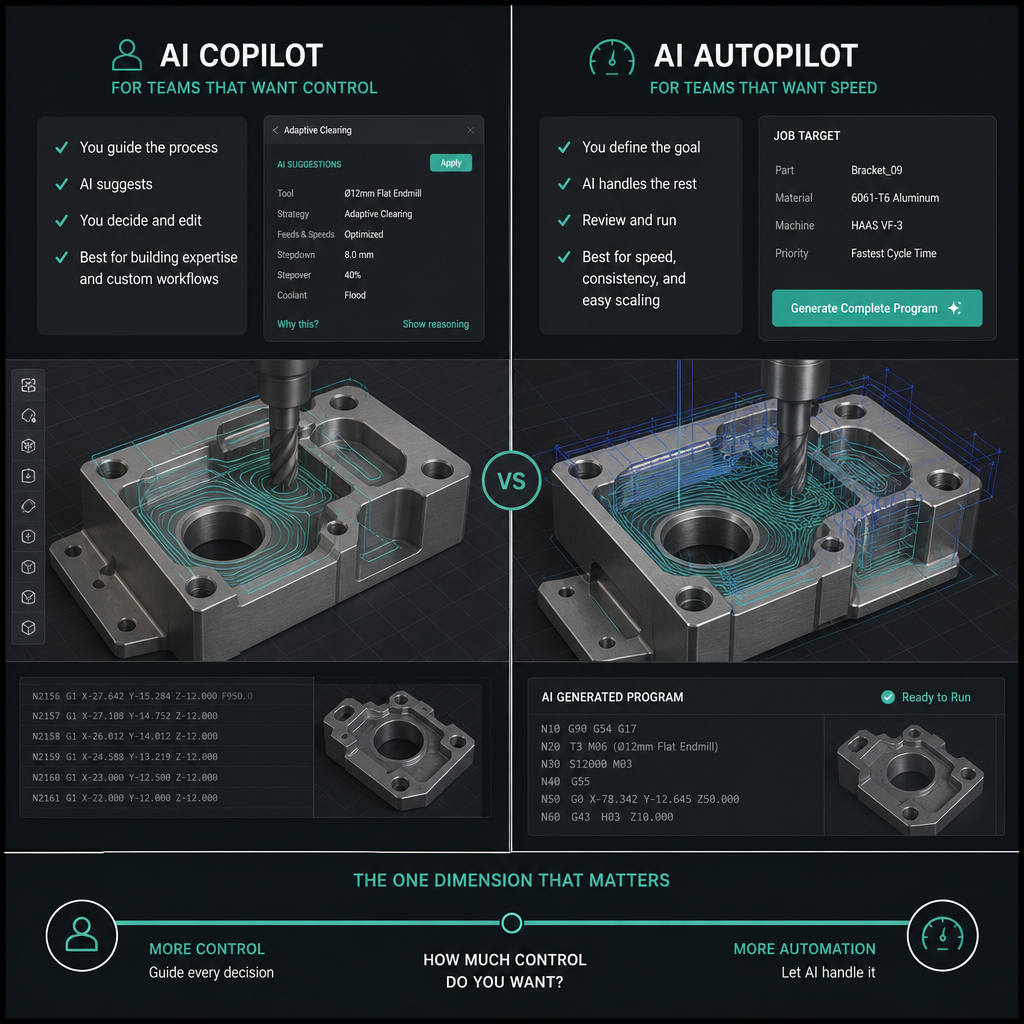
After the architecture decision, the next step is a pilot that reflects how your programmers actually work. Do not start with a generic benchmark. Choose a part family that already exposes your programming bottleneck, whether that means hard material, multiple setups, tool reach limits, 5-axis or mill-turn decisions, or first-article history. Give the system your normal tools and require native CAM output that a lead programmer can edit.
The pilot should answer three questions. Can the AI create useful native operations inside your CAM environment? Can the programmer understand and change the setup without rebuilding it? Does the first-article loop improve without adding hidden verification work?
Limitless Labs is worth evaluating if those are the questions you need answered, especially for teams working in Siemens NX, Mastercam, or PTC Creo. Bring a real part. Keep the programmer in control.
Schedule your free demo today to automate your CNC programming in minutes.
Frequently asked questions
Does AI CNC programming software use real cutting physics, or does it only imitate G-code?
A production-ready AI CAM tool should use cutting physics and tool data, along with geometry and machining constraints, rather than imitating blocks of code. The practical test is whether the software can explain its choices through editable CAM operations. If all you get is posted G-code, the programmer has to infer the setup logic after the fact, which is a weak position for difficult materials or multi-axis work.
Can AI CAM tools generate editable operations inside Siemens NX, Mastercam, and PTC Creo?
Yes, the native integration model is built for that purpose. The Limitless CAM Agent programs CNC parts inside Siemens NX, Mastercam, and PTC Creo, so the programmer reviews CAM operations rather than a detached code file. That matters because the existing CAM environment already contains the factory's tools, posts, machine context, and review habits.
Can AI CNC programming handle 5-axis and mill-turn parts?
AI CAM can be evaluated for 5-axis and mill-turn work, but the architecture matters. Native CAM output gives the programmer a structured way to inspect tool orientation, clearance, operation order, and post behavior. Standalone G-code creates a heavier verification burden because the programmer is reviewing the final motion without the same editable operation tree behind it.
Can AI CAM software set cutting parameters for Inconel and heat-resistant alloys?
A useful system should propose feeds, speeds, and strategies in the context of the tool and material, plus engagement and operation type. For Inconel and heat-resistant alloys, generic values are not enough because tool wear and chip behavior are tightly connected to surface finish and dimensional accuracy. The programmer still needs to review and approve the parameters before posting.
How do lead programmers review and verify AI-generated toolpaths before posting?
Lead programmers should review AI-generated work the same way they review serious CAM output: inspect the operation tree, tool choices, holders, boundaries, feeds, speeds, linking, simulation, and first-article requirements before posting. The strongest workflow keeps those decisions editable inside CAM, so corrections happen at the setup level instead of in raw posted code.